> ## Documentation Index
> Fetch the complete documentation index at: https://docs.signalhire.com/llms.txt
> Use this file to discover all available pages before exploring further.
# API Authentication
> To access the SignalHire API, you need to authenticate using an API key. The API key serves as a unique identifier and ensures that only authorized requests are processed.
All requests must include the API key in the request header.
## Obtaining an API Key
1. Register for a [SignalHire account](https://www.signalhire.com/registration?package=trial)
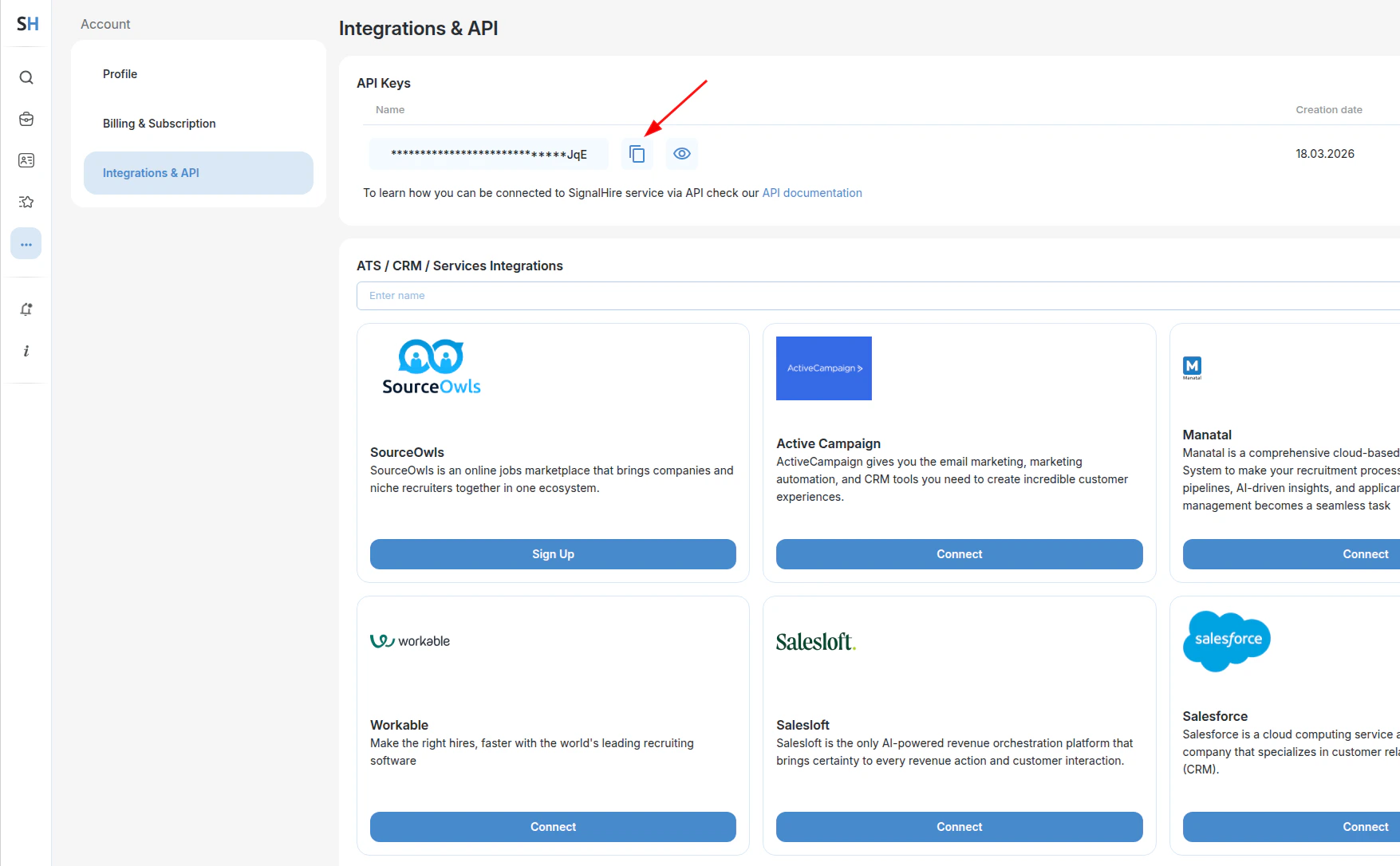
2. Open the left sidebar and navigate to **Other tools → Integrations & API**
3. Click **Create new API Key**, then copy the generated key using the copy icon next to it

 ## Using the API Key
Include the `apikey` header in every request:
```bash cURL theme={null}
curl -X POST https://www.signalhire.com/api/v1/candidate/search \
-H 'apikey: your_secret_api_key' \
--data '{"items": [...], "callbackUrl": "https://yourdomain.com/callback"}'
```
```python Python theme={null}
import requests
response = requests.post(
"https://www.signalhire.com/api/v1/candidate/search",
headers={"apikey": "your_secret_api_key"},
json={
"items": [...],
"callbackUrl": "https://yourdomain.com/callback"
}
)
```
```javascript Node.js theme={null}
const axios = require('axios');
const response = await axios.post(
'https://www.signalhire.com/api/v1/candidate/search',
{
items: [...],
callbackUrl: 'https://yourdomain.com/callback'
},
{
headers: { apikey: 'your_secret_api_key' }
}
);
```
```java Java theme={null}
import java.net.http.*;
import java.net.URI;
HttpClient client = HttpClient.newHttpClient();
HttpRequest request = HttpRequest.newBuilder()
.uri(URI.create("https://www.signalhire.com/api/v1/candidate/search"))
.header("apikey", "your_secret_api_key")
.header("Content-Type", "application/json")
.POST(HttpRequest.BodyPublishers.ofString(
"{\"items\": [...], \"callbackUrl\": \"https://yourdomain.com/callback\"}"
))
.build();
HttpResponse response = client.send(request, HttpResponse.BodyHandlers.ofString());
```
```ruby Ruby theme={null}
require 'net/http'
require 'json'
uri = URI('https://www.signalhire.com/api/v1/candidate/search')
http = Net::HTTP.new(uri.host, uri.port)
http.use_ssl = true
request = Net::HTTP::Post.new(uri)
request['apikey'] = 'your_secret_api_key'
request['Content-Type'] = 'application/json'
request.body = {
items: [...],
callbackUrl: 'https://yourdomain.com/callback'
}.to_json
response = http.request(request)
```
API keys must be kept secure. Exposing a key in public repositories or sharing it with unauthorized parties allows others to make API calls consuming paid credits.
## Checking Remaining Credits
The `X-Credits-Left` header is included in every API response and shows the current credit balance.
```http theme={null}
HTTP/2 201
Content-Type: application/json
X-Credits-Left: 243
```
Credits can also be checked explicitly — see [Get Remaining Credits](/person-api/credits).
## Using the API Key
Include the `apikey` header in every request:
```bash cURL theme={null}
curl -X POST https://www.signalhire.com/api/v1/candidate/search \
-H 'apikey: your_secret_api_key' \
--data '{"items": [...], "callbackUrl": "https://yourdomain.com/callback"}'
```
```python Python theme={null}
import requests
response = requests.post(
"https://www.signalhire.com/api/v1/candidate/search",
headers={"apikey": "your_secret_api_key"},
json={
"items": [...],
"callbackUrl": "https://yourdomain.com/callback"
}
)
```
```javascript Node.js theme={null}
const axios = require('axios');
const response = await axios.post(
'https://www.signalhire.com/api/v1/candidate/search',
{
items: [...],
callbackUrl: 'https://yourdomain.com/callback'
},
{
headers: { apikey: 'your_secret_api_key' }
}
);
```
```java Java theme={null}
import java.net.http.*;
import java.net.URI;
HttpClient client = HttpClient.newHttpClient();
HttpRequest request = HttpRequest.newBuilder()
.uri(URI.create("https://www.signalhire.com/api/v1/candidate/search"))
.header("apikey", "your_secret_api_key")
.header("Content-Type", "application/json")
.POST(HttpRequest.BodyPublishers.ofString(
"{\"items\": [...], \"callbackUrl\": \"https://yourdomain.com/callback\"}"
))
.build();
HttpResponse response = client.send(request, HttpResponse.BodyHandlers.ofString());
```
```ruby Ruby theme={null}
require 'net/http'
require 'json'
uri = URI('https://www.signalhire.com/api/v1/candidate/search')
http = Net::HTTP.new(uri.host, uri.port)
http.use_ssl = true
request = Net::HTTP::Post.new(uri)
request['apikey'] = 'your_secret_api_key'
request['Content-Type'] = 'application/json'
request.body = {
items: [...],
callbackUrl: 'https://yourdomain.com/callback'
}.to_json
response = http.request(request)
```
API keys must be kept secure. Exposing a key in public repositories or sharing it with unauthorized parties allows others to make API calls consuming paid credits.
## Checking Remaining Credits
The `X-Credits-Left` header is included in every API response and shows the current credit balance.
```http theme={null}
HTTP/2 201
Content-Type: application/json
X-Credits-Left: 243
```
Credits can also be checked explicitly — see [Get Remaining Credits](/person-api/credits).